

A modern church service often depends on visual information. Worship songs need to be displayed clearly so that the congregation can sing along. Bible passages should be available on screen when they are mentioned during a sermon. Announcements, photographs, videos, welcome messages, and other materials may also need to appear at exactly the right moment. Managing all these elements with different applications can make the work of a church media team unnecessarily complicated.
WorshipScreen provides a practical way to organize these visual elements in one place. It is a browser-based church presentation platform created specifically for worship services. It can be used to prepare song lyrics, display Bible verses, organize sermons, show images and videos, create countdowns, and control what appears on a projector, television, or other screen.
The platform is particularly useful for churches looking for a simple and accessible alternative to complicated presentation systems. WorshipScreen is available as a free tool, making it possible for churches of different sizes to organize their visual presentation without having to invest in expensive specialized software.
What Is WorshipScreen?
WorshipScreen is church presentation software designed around the way a real worship service works. Instead of treating songs, Scripture, videos, and announcements as completely separate presentation tasks, it allows them to be organized within the same service playlist.
The platform works through a web browser, so there is no need to install a traditional desktop application. A church can create an account, build its content library, prepare a service, and then control the presentation from a compatible device.
The main functions include worship song lyrics, Bible passages, images, videos, countdowns, custom slides, and presentation backgrounds. This makes WorshipScreen suitable for a wide range of church services and worship formats.
The software can be especially useful when the person operating the screen is a volunteer rather than a professional presentation technician. Once the basic workflow has been learned, recurring services can be prepared using the same process every week.
Why Free Worship Software Can Be Useful for Churches
Churches often have limited budgets, and presentation technology does not need to become one of the largest expenses. In many cases, the essential requirements are a computer or mobile device, a suitable screen or projector, an Internet connection, and software that can manage the service content.
free worship software gives churches an opportunity to organize presentations without purchasing an expensive professional license. WorshipScreen is free to use, while donations can support the continued development of the project.
This makes the platform suitable for small congregations that may have only one person responsible for presentation duties. It can also be useful for larger churches where several volunteers need to work with the same collection of worship songs and service materials.
Another advantage is the browser-based approach. A church does not have to build its entire technical system around one particular computer. Depending on the setup, the presentation can be prepared and controlled using a computer, tablet, or smartphone.
Setting Up WorshipScreen for the First Time
Getting started begins with creating an account and opening the WorshipScreen interface. Before preparing a complete service, it is useful to spend a little time configuring the general appearance of the presentation.
Text size, font, alignment, colors, positioning, and backgrounds all influence how easy the presentation is to follow. The screen should be designed primarily for the people sitting in the congregation, not for the person operating the computer.
Large, readable text is especially important. A lyric slide that looks comfortable on a laptop may be too small when viewed from the back of a large church.
Once the basic visual settings have been configured, the church can begin creating its content library.
Building a Worship Song Library
A reusable song library is one of the most practical features for churches that hold regular worship services. Songs that are entered once can be reused later rather than being recreated every Sunday.
To prepare a song, the user adds its title and lyrics and saves it to the library. WorshipScreen can then create presentation slides from the text. The automatically generated slides should still be reviewed before the service because line breaks and text distribution can affect readability.
A good slide should contain enough text for the congregation to follow the song comfortably without becoming overloaded. It is often better to divide long sections into several simple slides than to place an entire verse or chorus on one screen.
The worship leader’s actual arrangement should also be considered. If a chorus is repeated several times, the presentation should make those repetitions easy to follow. If the team plans to skip a verse or return to a bridge, the playlist should reflect that particular arrangement.
Over time, the library becomes a valuable resource. A church can maintain its frequently used songs and quickly assemble a new service without starting from an empty presentation.
Creating a Playlist for Sunday Worship
Once songs have been prepared, they can be organized into a playlist for a particular service.
A playlist acts as the visual plan for the event. It can contain songs, Bible passages, announcements, images, videos, countdowns, and other presentation elements.
For example, a Sunday morning playlist might follow this structure:
- Pre-service countdown
- Welcome slide
- Opening worship song
- Second worship song
- Church announcement
- Scripture reading
- Sermon presentation
- Additional Bible passages
- Closing worship song
- Final announcement or information slide
The exact structure depends on the church’s service order. WorshipScreen does not require every congregation to follow the same format. Instead, the playlist can be adapted to the way the church already conducts its services.
Naming playlists clearly is also useful. A title such as “Sunday Service – September 27” makes it easier to identify the correct presentation and return to previous services when necessary.
Adding Bible Verses to a Service
Bible passages are an essential part of many church presentations. Instead of asking members of the congregation to search for every reference in a physical Bible or separate mobile application, the media operator can display the relevant passage on the main screen.
WorshipScreen allows Bible passages to be added to the service playlist. The operator can prepare known references before the service and place them in the same order as the sermon or Scripture reading.
This is particularly helpful when a sermon contains several passages. The presentation operator can move from one reference to another without leaving the main service workspace.
Preparation is still important. The operator should check the Bible translation, reference, and displayed text before the service begins. If the pastor is using a particular translation, the presentation should use the same version whenever possible.
At the same time, live services are not always predictable. A pastor may mention another passage that was not included in the original presentation. Having a flexible browser-based system makes it easier to respond to these situations without rebuilding the entire service.
Supporting Sermons With Visual Content
Church presentation software is not limited to worship songs. A sermon can also benefit from carefully selected visual material.
A pastor may want to display a Bible verse, a quotation, an image, a diagram, or a short video. Instead of switching between unrelated programs, these elements can be included in the same playlist.
The purpose of visual content should always be clear. The screen should help the congregation understand or follow the service rather than becoming a source of distraction.
For Scripture, readability and accuracy are more important than elaborate design. For sermon graphics, a simple layout can often communicate an idea more effectively than a crowded slide.
The media operator can prepare the main sermon content in advance while keeping enough flexibility to add a passage or other element during the service if the speaker changes direction.
Adding Images and Videos
Churches frequently use visual media for announcements, outreach activities, special events, youth programs, conferences, and community projects.
WorshipScreen allows images and videos to be incorporated into the presentation. A church can therefore include photographs from previous events, promotional graphics for upcoming activities, or video material within the same service workflow.
Videos can be especially useful before a service begins or during a transition between different parts of the program. However, they should always be tested beforehand.
An Internet-dependent video can behave differently during a live service than it did during preparation. The operator should check the connection, confirm that the correct video opens, and verify that the sound is available if audio is required.
When using photographs or video as backgrounds, it is also important to make sure that text remains readable. A visually attractive background can become a problem if it makes white or dark lyrics difficult to see.
Creating a Countdown Before the Service
A countdown provides a simple way to prepare the congregation for the beginning of a service.
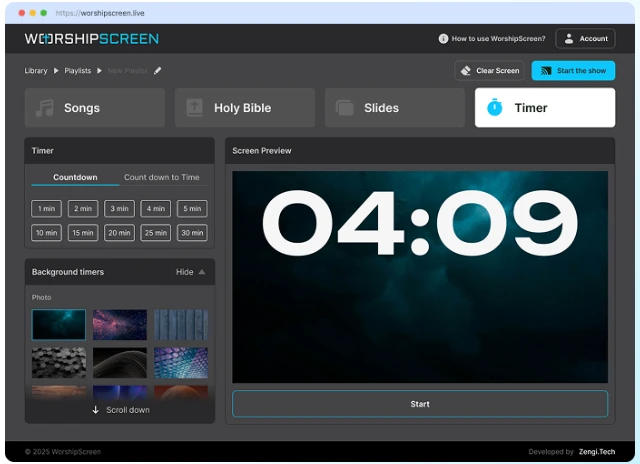
WorshipScreen includes countdown functionality that can be used before worship begins. A church can display a timer for a specific number of minutes or prepare a countdown toward a scheduled starting time.
The screen can include an appropriate background, image, or video. This creates a clear transition between the period when people are entering the building and the official beginning of the service.
A countdown is also useful for special events, conferences, youth meetings, prayer gatherings, and other church activities where a presentation needs to begin at a defined time.
Connecting WorshipScreen to a Projector or TV
The software itself is only one part of the presentation system. The church also needs a suitable display.
A common setup uses a laptop connected to a projector or television with an HDMI connection. The computer can use an extended display configuration so that the operator sees the controls on the laptop while the congregation sees only the presentation on the external screen.
Another possibility is using a compatible TV with a browser. Depending on the church’s equipment and network configuration, the presentation display can be opened directly on the television while another device is used to manage the service.
The best setup depends on the size of the church, available equipment, Internet connection, and number of people involved in the media team.
Before an important service, every part of the connection should be tested. This includes the display, cables, Internet connection, browser, video playback, and sound.
Controlling a Live Church Service
After the playlist is prepared, the operator can open the presentation and start the live display. The control interface remains available to the operator while the congregation sees the presentation.
During worship, timing becomes extremely important.
The operator should follow the worship leader and change lyrics at the appropriate moment. Advancing a slide too early can make people lose their place, while changing it too late means the congregation may already be singing a different line.
The same principle applies to Bible verses. When the pastor announces a reference, the operator should display the correct passage promptly and keep it visible for an appropriate amount of time.
The playlist is therefore a guide rather than a script that must be followed blindly. If the worship leader repeats a chorus, changes the order of songs, or the pastor introduces an additional passage, the operator needs to respond accordingly.
Using WorshipScreen as Methodist Worship Software
Different denominations can have different service traditions, but the basic presentation requirements are often similar. Churches may need song lyrics, Scripture, announcements, sermon material, videos, and countdowns regardless of their denomination.
For congregations looking for methodist worship software, WorshipScreen can be used to organize these elements within a single browser-based presentation workflow.
A Methodist service can be prepared according to its own order of worship. Songs can be placed in the appropriate sequence, Scripture readings can be prepared in advance, and sermon passages can be added to the playlist. Announcements and event information can also be displayed when needed.
The same approach can be adapted by Baptist, Presbyterian, Anglican, Pentecostal, non-denominational, and other Christian congregations. The platform provides the presentation tools while the church determines how those tools are used during worship.
Preparing the Service Before People Arrive
The best way to avoid technical problems is to identify them before the service begins.
The operator should open the complete playlist and review every item. Songs should be checked for correct lyrics and slide breaks. Bible passages should be verified. Images should have the correct orientation and resolution. Videos should be tested from beginning to end, especially when they depend on an online connection.
The actual projector or television should also be used during testing. This helps reveal problems that may not be visible on a computer display.
The operator should sit or stand in different areas of the room to check whether the text is readable from various distances. If people at the back cannot easily read the lyrics, the font size or background should be adjusted.
A short technical check before every service can prevent many problems during the live presentation.
A Practical Weekly Workflow
After the first setup, a church can turn WorshipScreen into a repeatable weekly process.
Start by checking the order of service and identifying all songs, Scripture references, announcements, and media that will be needed. Add any new songs to the library and update existing material if necessary.
Next, create the playlist and place every element in the expected order. Prepare Bible passages and sermon slides, add announcements, and configure the countdown.
Then review the complete presentation on the actual display. Check text size, colors, backgrounds, videos, sound, and Internet connectivity.
Finally, open the presentation before the service starts and keep the control device ready. During worship, follow the actual service rather than relying only on the original plan.
This workflow makes presentation management much less stressful because most of the work is completed before the congregation arrives.
Making Church Presentation Simple and Consistent
A presentation system should support worship rather than compete with it. The congregation should be able to read lyrics and Scripture immediately without thinking about the technology behind the screen.
WorshipScreen provides a centralized environment for this purpose. Songs, Bible verses, sermon materials, images, videos, announcements, and countdowns can all become part of the same service presentation.
Its browser-based design also makes the system accessible to churches that do not have a dedicated technical department. A volunteer can learn the basic workflow, create reusable content, and gradually build a library that makes future services easier to prepare.
For larger churches, the same system can provide a consistent structure for the media team. Standardized playlists, visual settings, and reusable songs can reduce repetitive work and make it easier for different volunteers to operate presentations.
Conclusion
Church presentation software does not have to be complicated to be useful. The essential goal is to provide the congregation with clear and timely visual information while allowing worship leaders, pastors, and media volunteers to concentrate on the service itself.
WorshipScreen brings the most common presentation tasks into one browser-based environment. Churches can create song libraries, prepare Bible passages, organize sermons, add images and videos, create countdowns, and control the presentation from a compatible device.
Because the platform is free to use, it can be a practical option for churches that want to organize their visual presentation without purchasing expensive software. The most effective results come from combining the technology with good preparation: check every slide, test the equipment, prepare the playlist in advance, and remain attentive to what is happening during the live service.
Used in this way, WorshipScreen can become a simple and flexible part of a church’s weekly workflow, helping the congregation follow worship songs, Scripture, announcements, and sermons clearly from the beginning of the service to the end.